In the ever-evolving digital landscape of 2026, Windows Update remains a linchpin for keeping your operating system running smoothly and securely. This year, Microsoft has rolled out significant updates that not only enhance the functionality of Windows 11 and 10 but also shore up security vulnerabilities. Here’s a deep dive into the latest updates, how to stay on top of them, and why keeping your system current is more crucial than ever.
Understanding the April 2026 Windows Security Update Patch Tuesday
Windows Update has always been pivotal for maintaining system integrity, but the April 2026 Patch Tuesday update is particularly noteworthy. This update, designated KB5083769, addresses a plethora of vulnerabilities, including two zero-day exploits. Microsoft’s proactive approach in releasing these updates ensures that users are protected against the latest threats.
For those unfamiliar, Patch Tuesday is a monthly routine where Microsoft releases critical updates for its operating systems. This structured approach helps users stay on top of the latest security patches and feature enhancements. The April 2026 updates are no exception, offering a robust defense against cyber threats and system malfunctions.
Here's a quick rundown of what the KB5083769 update includes:
- Security patches for over 20 vulnerabilities.
- Improved performance and stability across various system components.
- Enhanced security features to protect against emerging threats.
How to Install Windows Updates Manually and Automatically
Staying on top of Microsoft Windows Update is straightforward, whether you prefer manual control or automated updates. For those who like to be hands-on, Microsoft provides the Microsoft Update Catalog - a comprehensive repository where you can find and download any update you need. This tool allows you to manually install updates without relying on the automated Windows Update feature.
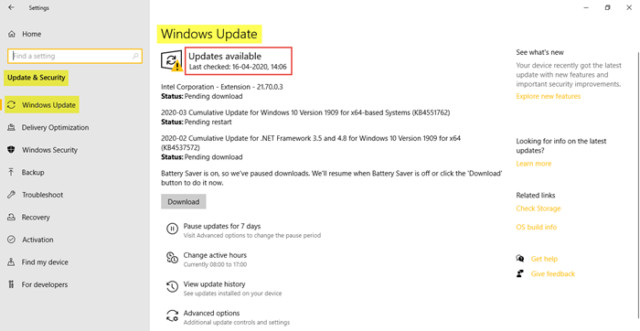
For most users, the automated process is the go-to method. You can check for updates on both Windows 11 and 10 by navigating to Settings > Update & Security > Windows Update. This will initiate a scan for the latest updates, which you can then download and install with a single click.
Sound familiar? It should. Regularly checking for updates is a habit worth cultivating, especially with the increasing sophistication of cyber threats. Microsoft’s support page offers a step-by-step guide on how to install these updates efficiently, ensuring your system remains secure and up-to-date.
Why Microsoft is Pushing the Windows 11 25H2 Update
Microsoft's decision to force the Windows 11 25H2 update on all eligible devices running the older 24H2 version is a strategic move to bolster security. The support for Windows 11 24H2 officially ends on October 13, 2026, leaving devices vulnerable to emerging threats. By transitioning users to the latest version, Microsoft ensures that all devices are protected with the most current security updates.
This move has sparked some debate, with users wondering about the necessity of such a rigorous update policy. However, Microsoft’s stance is clear: uniform updates across all devices enhance overall system security and performance. The company also provides an option to postpone the update, giving users a chance to prepare their systems for the transition.
Here’s a quick tip: If you’re running an older version of Windows, now is the perfect time to consider an upgrade. The benefits of the latest updates far outweigh the inconvenience of a temporary system refresh. And then — get this — it might just make your computing experience smoother than ever.
"Keeping your Windows system up-to-date is more than just a recommendation; it's a necessity in today's digital world."
Look, I know what you're thinking: "Why should I bother with all these updates?" Well, imagine this: You’re cruising along on your latest gaming session, and suddenly, your system crashes. It’s not just annoying; it could be catastrophic if you're working on important projects. Regular updates ensure that your system remains stable and secure, allowing you to focus on what matters most.
So, the next time you see that little notification popping up — don’t ignore it. Embrace the update, and enjoy a smoother, safer computing experience.